
Add-on · €45 a month
Accounting
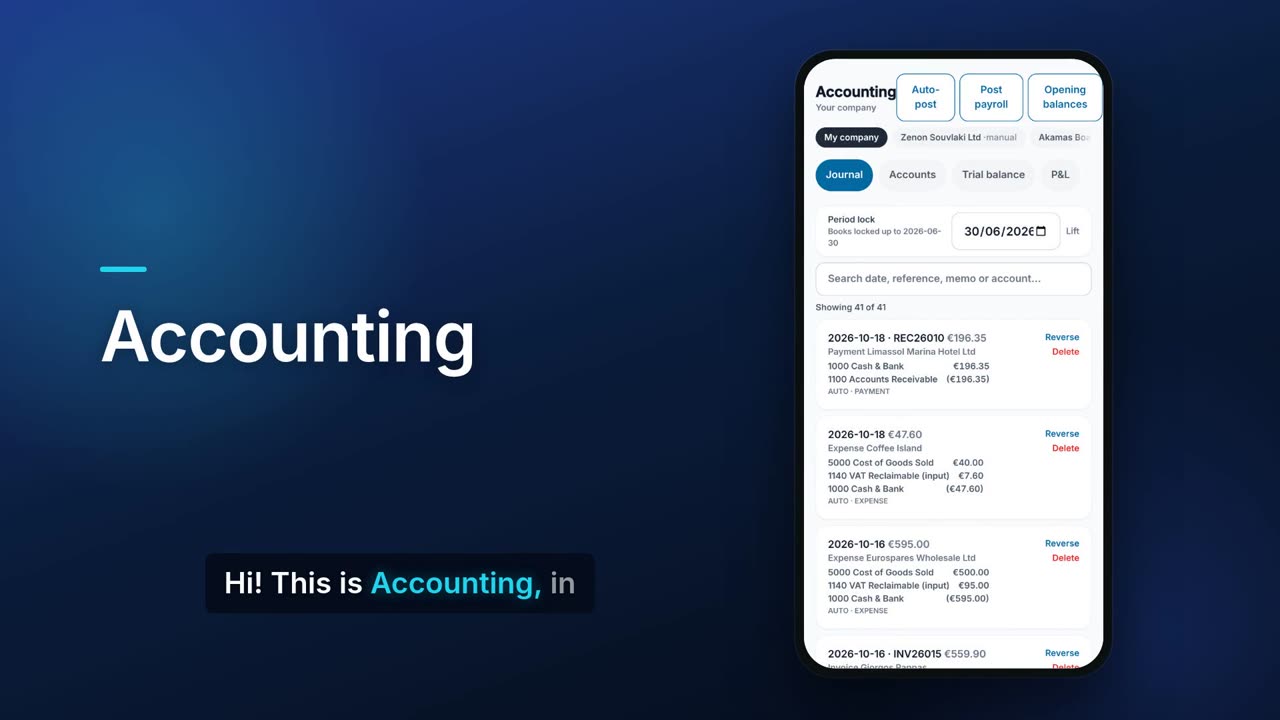
Accounting turns your invoices, receipts, expenses and credit notes into balanced journal entries with one tap. From those entries you get a trial balance, profit and loss, balance sheet and a box-by-box draft of your Cyprus VAT return. You can give your accountant controlled access, and accountants can keep several clients' books in one place.

See it in one minute.
What it does.
Chart of accounts templates
Start from a Basic or a Cyprus Standard chart of accounts, then add, edit, group and search accounts. Accounts used by automatic posting can be renamed but not deleted.
One-tap auto-post
Auto-post turns invoices, receipts, expenses and credit notes into balanced journal entries. Running it again only posts what is new. A receipt paid in cash posts to the bank or to Petty Cash, as you choose in Settings; cheques, cards and transfers always go to the bank.
Stock in the books (with Warehouse and Purchasing)
A supplier invoice entered on a goods receipt posts Inventory and VAT reclaimable against the supplier, not an expense, and its payment clears the supplier. When you sell the goods, their cost is booked as cost of goods sold. With POS, till sales post automatically too, from 24 October 2026 or the day you choose in Settings.
Journal with safe corrections
Add manual entries that must balance before they post, search the journal, and correct mistakes with a reversing entry instead of deleting. An entry can also reverse itself on a later date, for accruals.
Opening balances
Enter your opening balances in a short form, or import them from a CSV file.
Period lock
Lock the books up to a date so nothing dated inside a closed period can be posted, edited or deleted.
Trial balance and balance sheet
See every account's debit and credit as of any date, and a balance sheet that checks assets equal liabilities plus equity. Both export to CSV.
Profit and loss
Profit and loss for any dates, filtered by cost centre or compared with the previous period, with a simple cash flow summary underneath. Bars show income, expenses and the result, and a ring chart shows where the money went.
Who owes what, and how late
Receivables and payables aging in 0 to 30, 31 to 60, 61 to 90 and over 90 day buckets, each shown as a coloured bar, with the list of unpaid bills. Pick any customer or supplier to see their statement and export it.
Cyprus VAT return draft
Form 4 boxes 1 to 11B are worked out from your books for any period, with a shortcut to your own VAT quarter, chosen in Settings › Money › VAT periods. It also counts supplier invoices entered on goods receipts and till sales. It is a draft for you to check before you file it yourself on the Tax Department's portal.
EC Sales List and OSS
Your EU business sales grouped by customer VAT number, plus OSS sales by country, ready to export as CSV.
Filed returns and VAT lock
Mark a finished VAT period as filed to lock it, and keep a history of your filed returns.
Bank reconciliation
Enter the statement closing balance and tick the matching lines, or import the statement CSV to match them for you. Lines missing from your books can be posted from there.
Fixed assets
Keep an asset register with Cyprus wear-and-tear rates set by category, editable per asset. Post depreciation, record a disposal, or import assets from CSV.
Cost centres, budgets and projects
Tag entries with cost centres, profit centres or projects, set budgets and compare them with actual figures, and see income, costs and margin per project.
Accountant pack
Download one ZIP with the trial balance, profit and loss, balance sheet, general ledger, VAT summary, asset schedule and aging as CSV files.
Give your accountant access
Create a one-time token that expires after 24 hours and tick exactly what your accountant may do, from books and reconciliation to payroll, stock, invoicing, expenses, purchasing and bank. You can revoke it at any time. An invoice your accountant issues that would take a client over their credit limit waits for your approval in the app.
Log of accountant changes
Every change a connected accountant makes is recorded in a log they cannot edit or delete.
For accounting firms
Keep clients' books in one place: connect Flow clients by token, add manual companies whose books you keep yourself, or view a CySo Invoicing company read-only. A worklist shows which connected clients have VAT due or documents to post. Accounting keeps the clients' books; their payroll is kept in Payroll › Client companies, and payroll run there can be posted into the client's books.
Real screens.
From the app, using a demo company.


Price.
Prices exclude VAT. Yearly billing costs the same as 10 months. See all CySo prices.
€45 / month + VAT
Accounting is an add-on on top of the Pro plan or higher. Like every module, it starts with a 90-day trial. For accountants: keep the books of your client companies from your own account, €6 a month per client company or in packs (see the prices page). Your own company pays only the module price. Yearly costs the same as 10 months.
Works well with.
Try Accounting in CySo Flow.
Start on the free plan and switch modules on from inside the app.