
Included in every plan
Invoices
Invoices start as drafts and get their tax-invoice number only when you issue them. You record full or part payments, give the client a receipt, and correct mistakes with a credit note instead of editing an issued invoice. The free plan includes up to 10 tax invoices a month.

See it in one minute.
What it does.
Draft first, numbered on issue
Save an invoice as a draft. The tax-invoice number is taken only when you issue it, and an issued invoice is final. Staff get their invoice and receipt numbers from the server, so two people never get the same number.
Numbers by the app or typed by hand
In Settings › Money, company invoices are numbered by the app (the default) or typed by hand, for example from a paper invoice book. A van with its own series can do the same (with Warehouse): the office types in the driver’s paper invoice numbers after the route. Every number is checked, whether it is typed or given by the app, the AI connector, the API or your accountant, so the same invoice number can never be used twice.
One-off and recurring rows
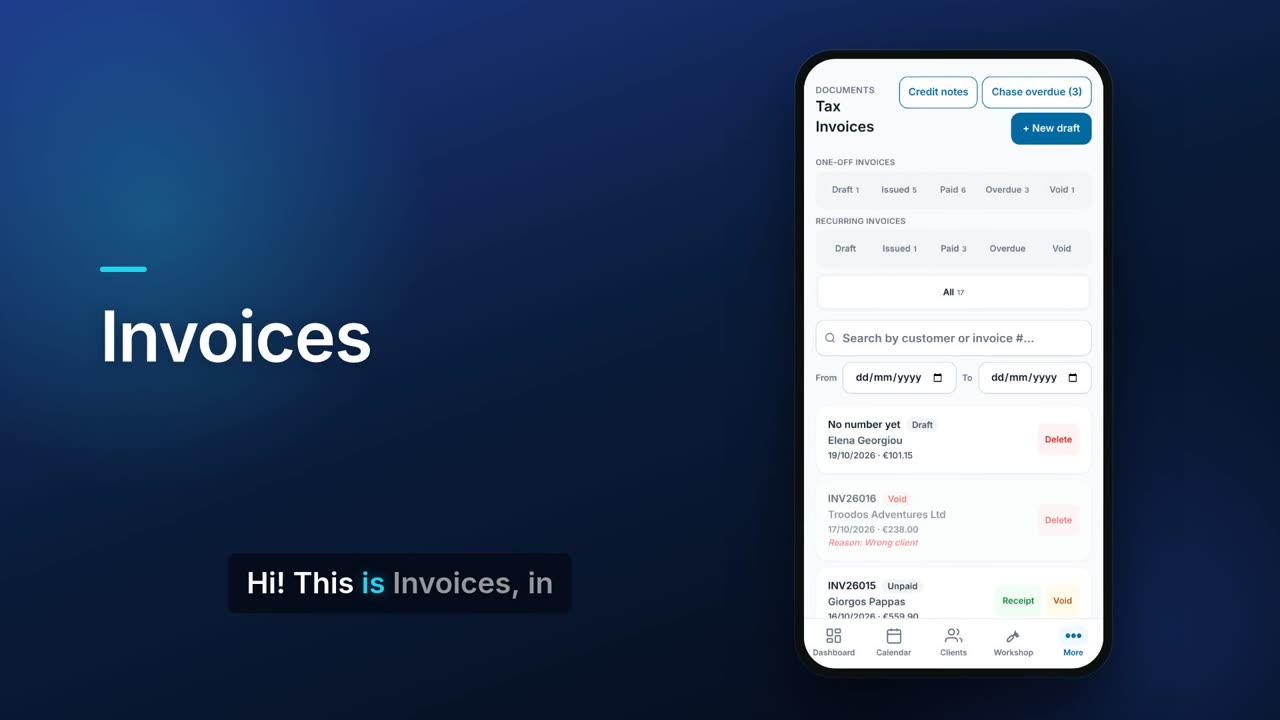
Separate chip rows for one-off and recurring invoices, each split into Draft, Issued, Paid, Overdue and Void, with a count on each.
Due dates and overdue
Each invoice has a payment due date. The Overdue chip lists the invoices past it and how much is still due on each.
Search and date range
Search by customer or invoice number and narrow the list to a from and to date.
Part payments and receipts
Record a payment and the amount starts at the balance still due. Part payments add up, and Flow refuses a payment larger than what is owed.
Receipt PDFs
Choose one of five receipt templates and an accent colour, then download or share the receipt. With your own email (SMTP) set up you can also email it to the client.
Payment history
Open the list of every receipt recorded against an invoice.
How the client paid
Each receipt records Cash, Cheque, Card or Bank transfer, with a default method set in Settings. A cheque also gets its number, the date on the cheque (it can be post-dated) and the bank. With the Accounting add-on, cash receipts are booked to the bank or to Petty Cash, as you choose in Settings.
Cheques list, Cleared or Bounced
Once a receipt is paid by cheque, a Cheques list shows each one as Not yet due, Due, Cleared or Bounced, and you are notified when a post-dated cheque is due. Marking a cheque Bounced voids its receipt, which is kept, and the invoice shows as owing again.
Issue time in the app
The invoice list and the invoice screen show the date and time each invoice was issued. The time is shown in the app only, never on the PDF.
Credit limit check before issuing
If an invoice would take a client over their credit limit, the owner or a co-admin sees what the client owes and is asked Issue anyway? before anything is saved, and No uses no invoice number. Other staff cannot issue it: they press «Ask permission» on the draft, and the company administrator, plus anyone they choose in Settings › Money › Credit-limit approvals, gets an e-mail with Approve and Reject (they can also answer in the app); the first answer decides. An approval is for that one invoice with exactly those figures; if the invoice changes, they must ask again. Recurring invoices are issued without asking and you get a notification. An invoice that the AI connector, your accountant or the API asks to issue over the limit is not issued: it waits for the owner's approval in the app.
Credit notes
Correct an issued invoice with a credit note that has its own number, names the invoice it corrects and states a reason. You can also give a general credit to a client, apply it to an unpaid invoice or record a refund, and download or share it as a PDF.
Numbering per van (with Warehouse)
In Settings › Money › Numbering per van, give a van its own series for invoices and another for credit notes, for example ΒΑΝ1-0001. Invoices sold from that van or for its driver, and their credit notes, take the van's numbers; a general credit note can be issued from a van too. The next number can be raised, never lowered. The Invoices and Credit notes lists filter by series.
Void or reissue
Void an invoice with a reason and it stays in your records. Edit / reissue voids it and creates a corrected copy.
Document types and VAT treatment
Issue a tax invoice, a proforma or a reverse-charge invoice. Set the VAT treatment: standard, zero-rated, exempt, EU B2B goods or services, EU B2C distance sale (OSS) or out of scope.
Currencies, discounts and deposits
Invoice in another currency with its exchange rate, discount the whole invoice, require a deposit, or bill someone who is not a saved client.
Client prices on invoice lines
Add an item from your catalogue and a client with their own price list gets their price. Choose or change the client and the lines Flow priced take that client’s prices at once, with a note saying how many changed; prices you typed stay as they are. On screen, a client price lower than the standard price is green ▼ and a higher one red ▲. The colours are for your staff only: never on the PDF or the customer portal.
Stock on hand as you invoice (with Warehouse or Inventory)
When you add an item, the list shows how many are in stock, or out of stock; with Warehouse, in the warehouse or van the invoice ships from. If a line needs more than you have, Flow lists what is short when you issue. The invoice is still issued, and stock never goes below zero.
Recurring invoices
With the Subscriptions module on (from Pro), set an invoice to repeat weekly, every two weeks, monthly, quarterly, every six months or yearly.
PDF, share and e-invoice
Reprint the PDF in English or Greek, or send it through your phone's share sheet. With the Accounting add-on you can also download an EN 16931 / Peppol UBL e-invoice (XML).
A4 or A5 paper
Choose A4 or A5 in Settings for invoices, receipts, quotations and service reports. A4 is the default.
Your own layouts (paid plans)
In Settings › Documents, the owner or a co-admin can design invoice and credit-note layouts on A4 or A5 with the Document designer: drag and resize boxes, order them in layers, add your own text, images, lines and a QR code made from a link, and set your colours, text sizes, bold and italic. Keep up to 3 layouts per document type, make one the default and pick another on each document. The PDF uses it, and an issued document keeps the layout it was issued with. On Starter, Pro and Teams; the free plan keeps the standard layout.
Chase overdue invoices
With your own email (SMTP) or SMS set up, one button sends a reminder for every overdue invoice. You can also switch on automatic reminders in Settings: once a day Flow emails the client from your own email (SMTP) when an invoice is the days overdue you set (7 by default), then again at most every so many days (7 by default). An invoice with no due date counts as due 30 days after issue. When you first switch it on, only invoices overdue within the last 90 days are chased. It needs data kept in the CySo cloud.
Real screens.
From the app, using a demo company.


Price.
Prices exclude VAT. Paid plans have no invoice limit. See all CySo prices.
Included
The free plan includes up to 10 tax invoices a calendar month, and is unlimited for a new account's first 90 days. Drafts, proformas, credit notes, receipts and quotations do not count. Paid plans are unlimited. Recurring invoices need Subscriptions, from Pro.
Works well with.
Try Invoices in CySo Flow.
Start on the free plan and switch modules on from inside the app.