
Add-on · €39 a month
Delivery
Your office creates deliveries, or takes an order over the phone that becomes one, and assigns it to a driver. Drivers can work from the CySo Flow Delivery app on an Android tablet: they see their route, deliver, take the customer's signature and issue delivery notes, even without a connection. Each drop moves through fixed steps, from Waiting to Delivered, and every step is time-stamped. The customer gets a link to a page that shows where their order has got to, without showing their address or phone number.

See it in one minute.
What it does.
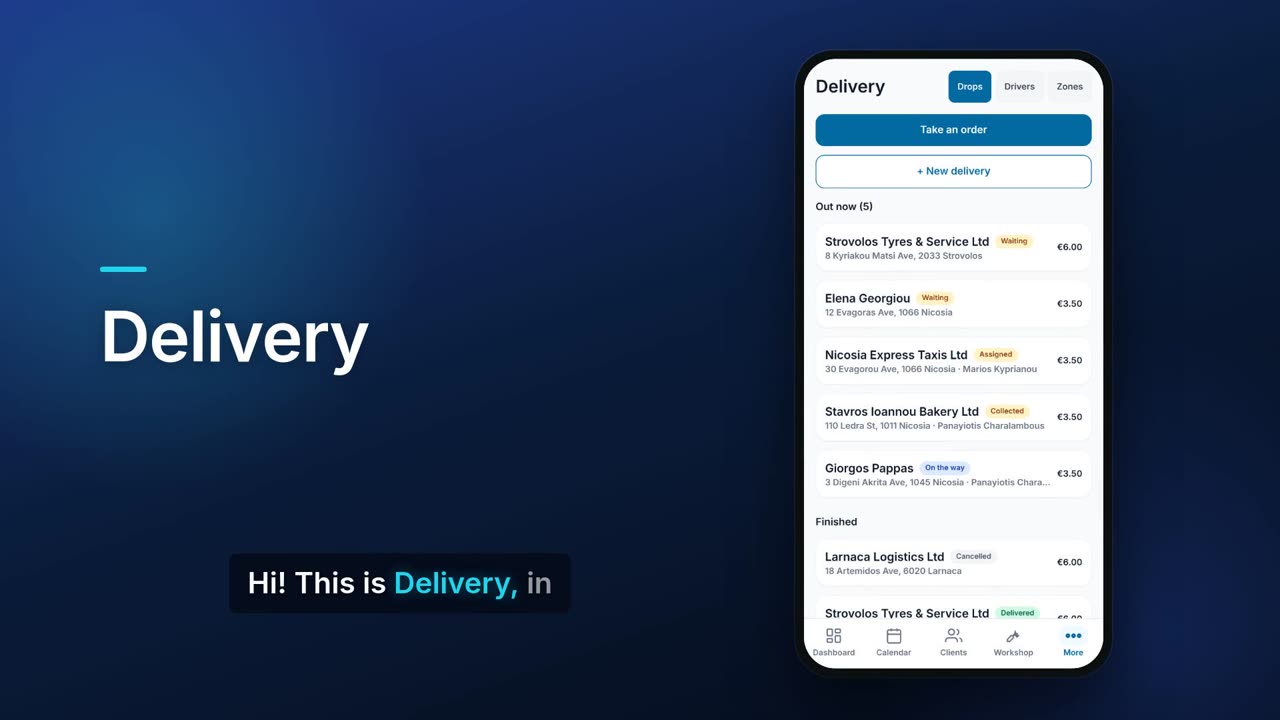
Drops out now, and finished
See every active drop with its customer, address, driver, status and fee, and the finished ones below.
Fixed delivery steps
A drop goes Waiting, Assigned, Collected, On the way, Delivered. Only the next allowed step is offered, so a drop cannot skip a stage.
Every step time-stamped
Each drop shows a timeline with the time it was assigned, collected, set off and delivered.
Proof of delivery
Take the customer's signature on screen, or a note such as 'left with neighbour', when you mark a drop delivered. On the driver tablet, the customer signs on the tablet's screen, and the signature is shown with the drop in Flow.
Failed drops and retries
If a drop cannot be delivered, record why. You can then assign it again as a new attempt, and the earlier attempt's times are kept.
Delivered drops charge the driver
When a drop is marked Delivered, its driver is charged the order total, client prices and delivery fee included, once. A prepaid order charges nothing, and neither does a drop for a client marked «Pays on account» on their client card, since the driver collects nothing. With Warehouse on and a van for that driver, the goods also leave the van once. Cancelling a delivered drop puts the goods back into the van and reverses the charge; a delivered drop cannot be deleted.
Driver settlement
Delivery › Drivers shows, for each driver, what they were charged, the cash they handed over and what they still owe. Record cash handed over on the driver's card or on their van statement. A bar on each driver shows how much of the charge is paid and how much is still owed.
Take an order by phone
Build a basket from your priced Warehouse items, choose delivery or collection, and place the order. The delivery fee, by distance, by zone or at the client's own rate, is added to the total, and you can type a different fee. Staff who can edit Delivery can choose the driver while taking a delivery order, or leave it on Assign later; the drop is then created already assigned, and the goods come out of that driver's van when it is delivered. With more than one warehouse, choose the warehouse the order ships from. The order is recorded as unpaid and becomes a drop with its own tracking link. A client with their own price list is charged their price.
Drivers and their stops
Keep a list of drivers. Each one shows how many drops are out, delivered and failed, their average delivery time, and their current stops in order. With Warehouse on, every van has its driver, and you can add a van for a driver from their card.
Driver tablet app
Drivers work from CySo Flow Delivery, an Android app for a tablet in the van. Install it from the download link Flow shows in Delivery › Tablets and on the pairing screen, with Copy download link and a Share or WhatsApp button. The driver signs in with their own username and password and sees today's route: the load list and the stops in order. The app is in Greek or English, set for each driver.
Delivery notes at the door, even offline
At each stop the driver records what was delivered and issues a delivery note. Its number comes from a block of numbers Flow gives the van when the driver presses Start route, so delivery notes work without a connection: the tablet sends them to Flow when it is back online, and the drop is marked Delivered. If a stop cannot be delivered, the driver presses Could not deliver and says why.
Invoices at the door
A driver allowed to issue invoices can invoice the customer from the tablet when the company's invoice numbering is automatic. This needs a connection: Flow numbers the invoice centrally, checks that the number is never used twice and checks the customer's credit limit. Cash or a cheque taken with the invoice gets its receipt in the same step. Invoices and receipts can be e-mailed to the customer's address on file once the company's e-mail sending (SMTP) is set up.
What each driver may do
On the driver's form, Maximum discount % sets the most the driver may take off a price on the tablet (0 = no discounts). The tablet warns when a price goes past it, and every price change is flagged to the office. May issue chooses which documents the driver may issue on the tablet.
Tablets and drivers
In Delivery › Tablets, pair a tablet by showing a QR code that the tablet scans. The code works once, for 10 minutes, and Flow shows the model of the device that scanned it, so you can revoke it if it is not yours. Invite a driver from Delivery › Drivers: they open the link on their phone and choose their own username and password, which nobody at the office can see. The link works once, for 7 days, and Reset password signs the driver out of every tablet. Each tablet shows who is signed in, its app version and when it was last seen. A retired tablet can still send what it recorded before; one marked Lost / stolen stops at once. The tablet app needs CySo cloud storage.
Move a route to another tablet
If a driver has to change tablet in the middle of a route, Move route to another tablet in Delivery › Tablets releases the route. The old tablet can no longer send new deliveries for it, only what it had already recorded, for 24 hours, and its unused delivery note and receipt numbers are closed and never used again. The driver then presses Start route on the new tablet. Retiring a tablet, or marking it lost or stolen, releases its routes too.
Prices drivers can see
With Warehouse on, choose in Delivery › Drivers what drivers see on their own van screen: no prices (the default), cost prices only, or selling and cost prices. With selling and cost prices, a load for client orders shows both totals and a load of general stock shows cost only.
Delivery fee by distance or zone
Charge by straight-line distance in bands, for example 0–3 km €2 and 3–8 km €3.50, measured from the warehouse the order ships from when that warehouse has a map position, otherwise from the shop location. Past the last band, either refuse the delivery or charge the last band. Addresses are located on OpenStreetMap, which receives only the address. Office staff can type a different fee. An address that is not found is marked Fee to confirm, and the fee you confirm is added to the order total. Shops that use named zones keep them.
Delivery charge per client
On a client's record, set their delivery charge to Automatic (by distance or zone, as set in Delivery), Fixed (an amount you enter) or Free. It is used on phone orders and customer portal orders for that client, and a fee typed on the order still wins. A Fixed charge with no amount uses the automatic charge, and a client on a Fixed or Free charge is never refused as out of range.
Tracking link for the customer
Copy a link to a public page that shows the shop's name, the order reference, the driver's first name while on the way, and each step with its time. The address and phone number are never shown. The page opens in the language of the customer's phone, Greek, English or Russian (otherwise English), with an ΕΛ/EN/RU switch that the phone remembers.
Tracking page updates itself
The customer's page refreshes every minute while the delivery is live. Links expire after 30 days.
Call the customer from the drop
The customer's phone number on a drop is a tap-to-call link.
Link drivers to GPS trackers
With Traccar GPS connected, you can link each driver to a tracker, and the driver card shows when the tracker is reporting.
Real screens.
From the app, using a demo company.


Price.
Prices exclude VAT. Needs the Pro plan or above. See all CySo prices.
€39 / month + VAT
Delivery is an add-on on the Pro plan or above. Taking an order by phone needs priced items in Warehouse. Yearly costs the same as 10 months.
Works well with.
Try Delivery in CySo Flow.
Start on the free plan and switch modules on from inside the app.